In this post, I will highlight some steps to consider while building a ticketing system for handling customer operations for B2C brand.
I recently had the opportunity to deploy Freshdesk and Freshchat for a logistics startup GoSwift. It was an interesting exercise and I learnt a lot. I’m condensing some of my learning here:
A ticketing system is used to handle customer queries whether they be questions, issues, complaints or compliments. Each query is a ticket which is then appropriately resolved.
Incoming Query Channel
Setting up a good ticketing system starts with integrating all your incoming customer query channels. Your customers could reach out to you via a form in your website, the support email ID mentioned, other ways that are built into your product or social media. A good ticketing system tracks all the incoming channels mentioned in one place, creates tickets for each and passes them onto the resolution team
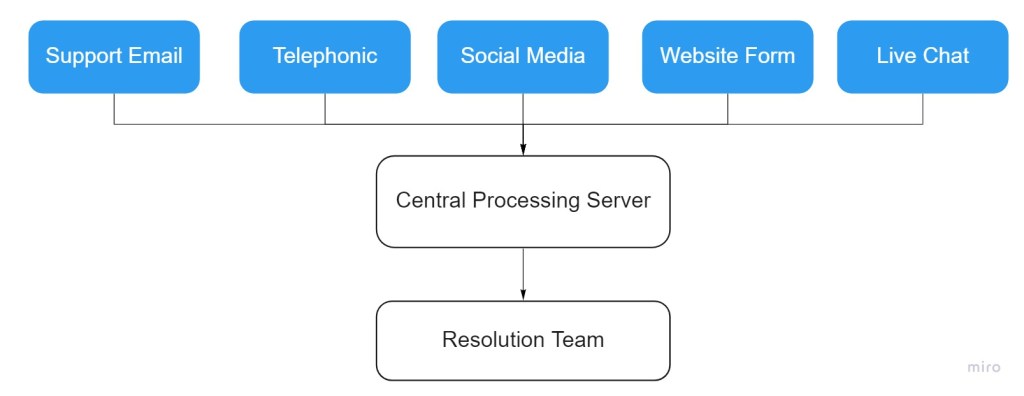
Resolution
There are several ticketing software that exist in the market today. Freshdesk and Zendesk are quite popular amongst them. I had the chance to work on and setup Freshdesk this year. They allow options to integrate all incoming channels as well as do the processing of data. Here’s an example flowchart of a ticketing system based on incoming email system.
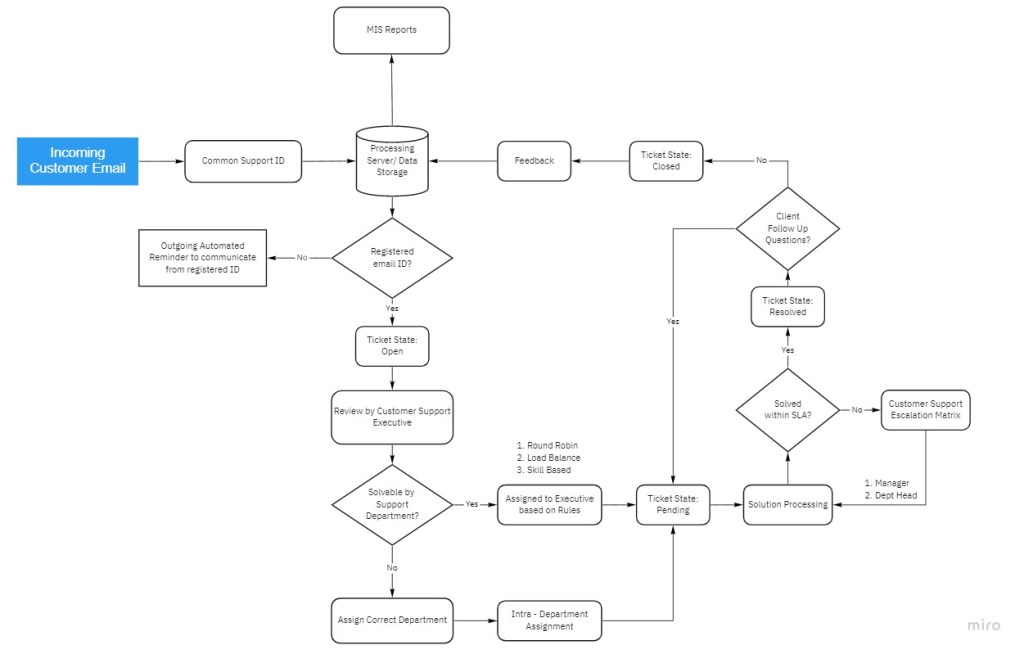
The customer support team can come in at two different places. They can read the ticket initially and assign it to the correct department when there are different departments, else the system can assign the ticket to a random agent/department based on rules. These rules are company/ industry specific and can be applied on several categories.
Example: A B2B subscription based firm may choose to segregate and give importance to tickets from paid users as compared to free users.
Example: A company like Swiggy usually does not need to segregate tickets as mostly all agents would be able to resolve the similar queries. Of course, these days they have topics before the chat which automatically redirect you to the correct department.
Freshchat (from Freshworks) allows to build topic based chat system
Ticket Distribution
Once the tickets come in, they have to be allotted to an executive. The tickets can be distributed according to several rules. Here’s three:
Round Robin
The tickets are assigned in a circular fashion without consideration to ticket content or the agent’s existing workload. It’s the easiest to implement and no other configurations need to be done.
Load Balanced
The tickets are distributed by balancing the workload of executives. If there is heavy volume of tickets with one executive, the system would skip assigning them the incoming ticket and assign it to the next executive, thereby balancing the load.
Skill Based
Certain organizations respond to tickets on a broad range of topics – such as product, tech, finance etc. and it’s almost impossible for executives to have expertise in all topics. Hence, skill based groups are created with sections of executives gaining expertise in specific topics.
Customer Support Portal
It’s a good idea to build a User Help Portal filled with FAQs and support articles. A really good support portal will have the status of the user ticket as well in case the ticket isn’t resolved in a short amount of time.
Here’s an example of the support portal of Freshdesk

 Pulkit Saraf