I had this idea back in 2020 to see just how much I’d spent on these lifestyle apps till date. The thought was to have an app that would tell me the sum totals of all whenever opened. I would have used this to keep a tab on my finances as well get a sense of control back in my life.
I planned to do this for food, travel, grocery, e commerce and more. We all use Uber, Ola, Zomato, Swiggy, bigBasket, Grofers, Amazon, Flipkart etc. and it would have been neat to see an amount of approximately a few lakhs spent next to each.
While the app is nowhere in sight, I did end up acquiring my entire lifetime’s data from Swiggy, Zomato and Uber.
Before diving deep into the three, I’d just like to point out that I also tried Ola and Amazon. I ran into the following problems.
- Ola
- Their website doesn’t have a user profile with the details of rides
- Their app doesn’t load the ride data with consistency
- Either way, they just don’t store the data beyond 100 rides as confirmed by their support!
- Amazon
- The website shows all the data but it’s organized very poorly for scraping
Swiggy
Their website was easy to scrape. The data is organized neatly and accessible easily. I used the webscraper.io Chrome extension. I already had experience with scraping swiggy using this tool, so it was straight forward enough to setup. For someone wanting to try the same, here’s the steps:
- Install the extension – link
- Go to your orders page on Swiggy – link
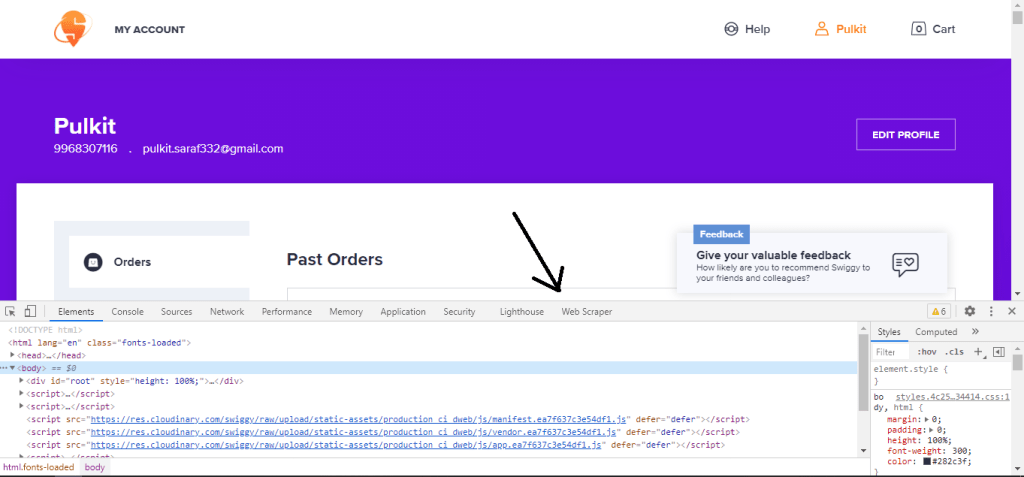
- Press F12 and you should see ‘Web Scraper’ option (see image)
- Click on Webscraper > Import Sitemap and paste the JSON script from the attached file ‘Webscraper-Sitemap-JSON’
- Select the sitemap and from the dropdown, click on ‘Scrape’
- You can then download the scraped data as csv

Zomato
Zomato was a little tricky. The webscraper extension did not work here because the HTML tags were dynamic on the page. Everytime I would start to scrape using my sitemap, the tags would change and I would fetch nothing.
I solved this problem using Python and specifically, the BeautifulSoup library. I don’t fully understand it yet, but I know it can automate chrome clicks, data entry and other operations without refreshing the browser.
Step by step instructions to get your Zomato Orders data
- Install/ Open python and paste the script shared below in Zomato-orders
- If not already present, download Chrome Driver compatible with your browser
- Change the phone number and the two directories as mentioned in the code and run Part A
- An OTP will be generated on your phone. Enter it and navigate to the Orders History page
- Execute Part 2 of the code and sit back as page after page is scraped in front of your eyes
Uber
Acquiring Uber data is the easiest of all. Believe it or not, they actually hand over the entire account data in a csv when requested!
Go ahead, Login in to Uber in your browser and request your data here – Link
Part 2 – Insights
Feel free to tweet this to your followers!
Here’s how you can scrape your online Zomato and Swiggy data for free!
Tweet
 Pulkit Saraf
2 replies on “Expenditure tracking on online lifestyle apps – data sourcing”
[…] As a way to understand total expenditure on lifestyle apps such as Ola, Uber, Swiggy, Zomato, BigBasket etc., I scraped/ downloaded my own personal data a while ago. (Read here) […]
LikeLike
[…] continuation of the previously published two posts (Sourcing the data, and Analysis part 1), I now bring the the third post of the series, which is part 2 of the […]
LikeLike